Updated October 3, 2026
Best Webcam UK 2026
In an age where virtual communication is paramount, having a reliable webcam can make all the difference. Whether for video conferencing, streaming, or simply k...
In an age where virtual communication is paramount, having a reliable webcam can make all the difference. Whether for video conferencing, streaming, or simply keeping in touch with loved ones, the right webcam enhances your online presence and ensures clear, high-quality visuals.
This guide reviews the best webcams available in the UK, helping you choose the perfect model to suit your needs. From basic models to advanced options with high-definition capabilities, we’ve covered all the essentials to help you make an informed decision.
Advertising Disclosure
Discountable is a free-to-use comparison site. When you click a “View Deal” link and make a purchase, we may earn a commission from the retailer — at no extra cost to you.
Our rankings may consider factors like price, availability, and product performance signals. We aim to keep recommendations unbiased and helpful.
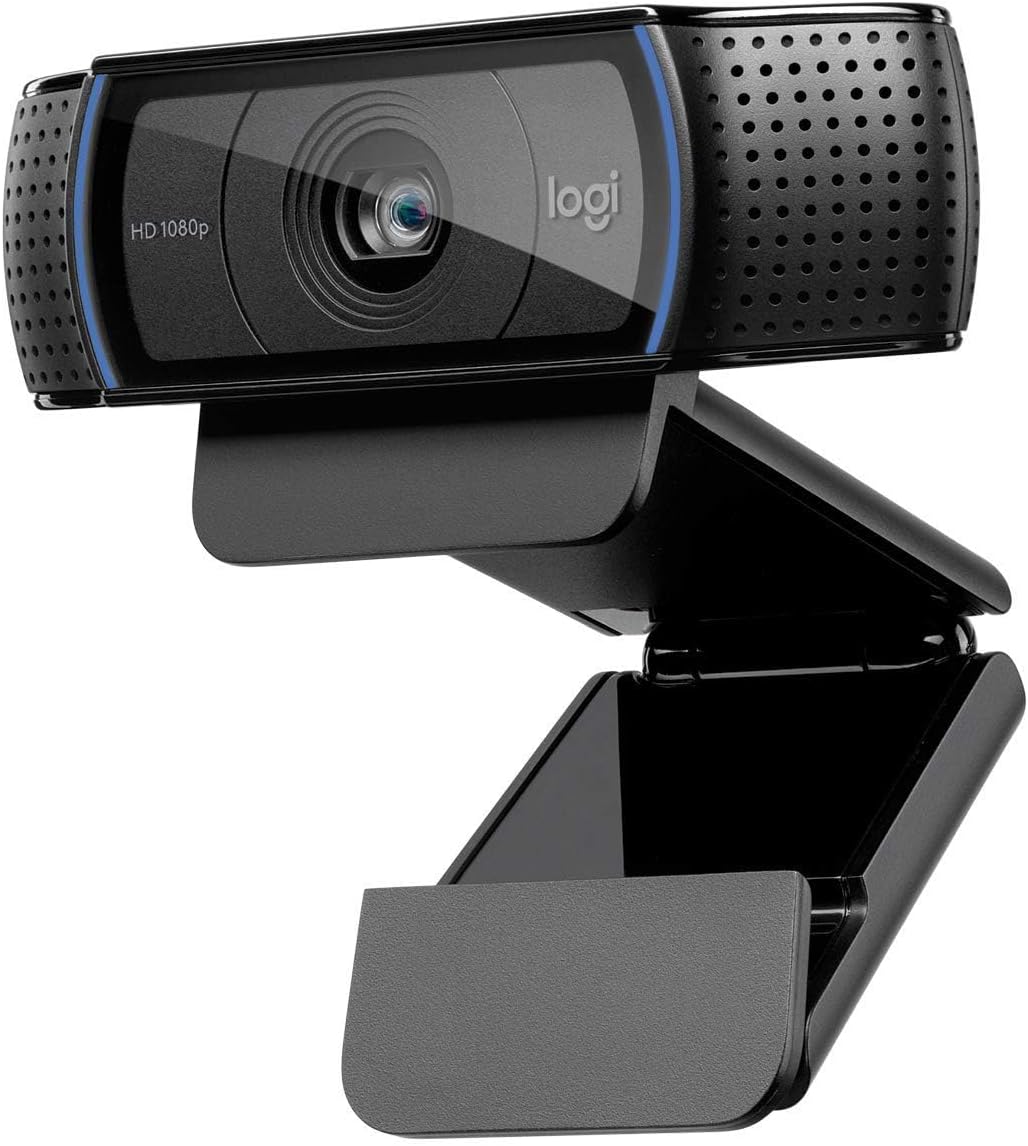
C920 HD Pro Webcam (960-001055)
C920 HD Pro Webcam (960-001055)
7% Off4.6★ (10,728)
Pros
- + High-quality video
- + User-friendly setup
- + Reliable performance
Cons
- − No built-in privacy shutter
- − Limited features compared to higher-end models
Best for: Individuals needing reliable video quality for meetings
The Logitech C920 HD Pro Webcam offers excellent video quality and ease of use, making it a top choice for many users.
Main highlights
- Full-HD Video Calling: This streaming webcam operates in full-HD 1080p video at 30-fps, whether you're on Skype or streaming yourself gaming in a strong HD 720p. It covers the full action. Connects to your device via USB
- Crisp Video Quality: Using this video calling device over wifi allows professionals and others to record rich content that is fluid, professional-looking and polished - such as demonstrations or showcasing your passions
- Full-HD Glass Lens: Users of this full HD streaming camera that captures a wide 78 degree field of view will be seen in high clarity and detail - the five-element glass lens with premium auto-focus capability shoots and records video that is crystal-clear
- Brighter Images: Equipped with automatic HD autofocus and light correction, this streaming webcam fine-tunes to your lighting conditions to produce bright, well-contrasted images - even if you're in a dim setting
- Full-HD Video Calling: This streaming webcam operates in full-HD 1080p video at 30-fps, whether you're on Skype or streaming yourself gaming in a strong HD 720p. It covers the full action. Connects to your device via USB
- Crisp Video Quality: Using this video calling device over wifi allows professionals and others to record rich content that is fluid, professional-looking and polished - such as demonstrations or showcasing your passions
- Full-HD Glass Lens: Users of this full HD streaming camera that captures a wide 78 degree field of view will be seen in high clarity and detail - the five-element glass lens with premium auto-focus capability shoots and records video that is crystal-clear
- Brighter Images: Equipped with automatic HD autofocus and light correction, this streaming webcam fine-tunes to your lighting conditions to produce bright, well-contrasted images - even if you're in a dim setting


Logitech C920S HD Pro Webcam (960-001252)
Logitech C920S HD Pro Webcam (960-001252)
50% Off4.5★ (10,557)
Pros
- + Full HD quality
- + Dual stereo audio
- + Privacy shutter included
Cons
- − No advanced features
- − Slightly pricier than basic models
Best for: Users wanting high-quality video calls
The Logitech C920S HD Pro Webcam stands out with its great audio and video features, ideal for clear conversations.
Main highlights
- Full-HD Video Calling: This streaming webcam operates in full-HD 1080p video at 30-fps, whether you're on Skype or streaming yourself gaming in a strong HD 720p. It covers the full action. Connects to your device via USB
- Crisp Video Quality: Using this video calling device over Wi-Fi allows professionals and others to record rich content that is fluid, professional-looking and polished - such as demonstrations or showcasing your passions
- Full-HD Glass Lens: Users of this full HD streaming camera that captures a wide 78 degree field of view will be seen in high clarity and detail - the five-element glass lens with premium auto-focus capability shoots and records video that is crystal-clear
- Brighter Images: Equipped with automatic HD autofocus and light correction, this streaming webcam fine-tunes to your lighting conditions to produce bright, well-contrasted images - even if you're in a dim setting
- Full-HD Video Calling: This streaming webcam operates in full-HD 1080p video at 30-fps, whether you're on Skype or streaming yourself gaming in a strong HD 720p. It covers the full action. Connects to your device via USB
- Crisp Video Quality: Using this video calling device over Wi-Fi allows professionals and others to record rich content that is fluid, professional-looking and polished - such as demonstrations or showcasing your passions
- Full-HD Glass Lens: Users of this full HD streaming camera that captures a wide 78 degree field of view will be seen in high clarity and detail - the five-element glass lens with premium auto-focus capability shoots and records video that is crystal-clear
- Brighter Images: Equipped with automatic HD autofocus and light correction, this streaming webcam fine-tunes to your lighting conditions to produce bright, well-contrasted images - even if you're in a dim setting

C270 HD Webcam
C270 HD Webcam
28% Off4.3★ (25,129)
Pros
- + Affordable price
- + 4K video quality
- + Compact design
Cons
- − Limited review count
- − Basic features
Best for: Casual users needing a decent webcam
The AOC Webcam offers great value for those looking for quality without breaking the bank.
Main highlights
- c270
- High Defintion
- Webcam
- c270
- High Defintion
- Webcam

PowerConf C200 2K Webcam for PC with AI Noise Cancelling Mics (A3369)
PowerConf C200 2K Webcam for PC with AI Noise Cancelling Mics (A3369)
34% Off4.4★ (9,401)
Pros
- + AI noise cancelling
- + Good video quality
- + Great for remote work
Cons
- − Limited availability
- − No 4K resolution
Best for: Remote workers and online learners
The Anker PowerConf C200 webcam is perfect for video conferencing, providing clear audio and video.
Main highlights
- Make a Good Impression: The 2K ultra-clear resolution on this USB webcam brings sharp clarity to every meeting. Be seen by your peers or impress your boss with your high-quality video calls.
- Built-In Privacy Cover: Your privacy is important to us. When not in use, you can slide on the built-in privacy cover to shield yourself from the USB webcam’s view.
- Versatile Field of View: Adjust how much the Mac webcam can see by choosing the angle of the lens’s opening. You can pick from 65°, 78°, or 95° via the AnkerWork software to show just your face or include what’s behind you.
- Look Nice in Any Light: The larger aperture size captures more light so that even without a ring light in low-light settings, you can still look bright and professional with this webcam for PC.
- Make a Good Impression: The 2K ultra-clear resolution on this USB webcam brings sharp clarity to every meeting. Be seen by your peers or impress your boss with your high-quality video calls.
- Built-In Privacy Cover: Your privacy is important to us. When not in use, you can slide on the built-in privacy cover to shield yourself from the USB webcam’s view.
- Versatile Field of View: Adjust how much the Mac webcam can see by choosing the angle of the lens’s opening. You can pick from 65°, 78°, or 95° via the AnkerWork software to show just your face or include what’s behind you.
- Look Nice in Any Light: The larger aperture size captures more light so that even without a ring light in low-light settings, you can still look bright and professional with this webcam for PC.

Full HD 1080P/30fps Webcam for PC/Laptop/Mac, Auto Light Correction (15728)
Full HD 1080P/30fps Webcam for PC/Laptop/Mac, Auto Light Correction (15728)
25% Off4.3★ (6,161)
Pros
- + Excellent value
- + Auto light correction
- + Compact design
Cons
- − Limited features
- − Basic audio quality
Best for: Students and casual video callers
The UGREEN Full HD Webcam is a great budget option that doesn't skimp on quality.
Main highlights
- PLEASE NOTE: The privacy cover is placed inside the box. Please check all contents carefully before use.
- 1080P Full HD Video Calling: Whether you want to live broadcast your video game on Youtube or have a video conference with your colleagues on Skype, this UGREEN webcam supports you to make high-definition video calls in 1080P at 30fps.
- Built-in Noise-Canceling Microphones: Webcam with dual microphone to capture natural stereo audio from up to 3 meters away. The digital noise reduction function helps you reduce background noise effectively. Enjoy clear conversations even in busy environments.
- Automatic Light Correction: Thanks to the DRC digital wide dynamic function, the USB camera automatically adjusts color temperature and light correction according to your lighting environment. Bright, high-contrast images can be produced even in dark scenes.
- PLEASE NOTE: The privacy cover is placed inside the box. Please check all contents carefully before use.
- 1080P Full HD Video Calling: Whether you want to live broadcast your video game on Youtube or have a video conference with your colleagues on Skype, this UGREEN webcam supports you to make high-definition video calls in 1080P at 30fps.
- Built-in Noise-Canceling Microphones: Webcam with dual microphone to capture natural stereo audio from up to 3 meters away. The digital noise reduction function helps you reduce background noise effectively. Enjoy clear conversations even in busy environments.
- Automatic Light Correction: Thanks to the DRC digital wide dynamic function, the USB camera automatically adjusts color temperature and light correction according to your lighting environment. Bright, high-contrast images can be produced even in dark scenes.
4K/30fps Webcam for PC, Ultra HD Auto Light Correction Webcam (65381)
4K/30fps Webcam for PC, Ultra HD Auto Light Correction Webcam (65381)
25% Off4.5★ (2,430)
Pros
- + Ultra 4K HD video
- + Dual noise-cancelling mics
- + Privacy cover included
Cons
- − Higher price point
- − May be overkill for casual users
Best for: Professional streamers and content creators
The EMEET NOVA 4K Webcam is designed for those who need top-notch video quality for streaming and professional use.
Main highlights
- 4K Image Quality: This webcam offers 4K resolution — 4x sharper than 1080P. An 8MP sensor captures more light, delivering brighter, detailed visuals.
- Auto Light Correction: With a built-in processor, this webcam auto-adjusts light balance even in low light. It restores 98% true-to-life image for a professional look.
- Dual Noise-Canceling Mics: The webcam’s dual mics, which filter out keyboard clicks and background noise, enhance human voice frequencies by 30% for crystal-clear audio.
- Privacy Cover Included: A detachable physical cover for this webcam blocks visual access, ensuring privacy from unauthorized viewing.
- 4K Image Quality: This webcam offers 4K resolution — 4x sharper than 1080P. An 8MP sensor captures more light, delivering brighter, detailed visuals.
- Auto Light Correction: With a built-in processor, this webcam auto-adjusts light balance even in low light. It restores 98% true-to-life image for a professional look.
- Dual Noise-Canceling Mics: The webcam’s dual mics, which filter out keyboard clicks and background noise, enhance human voice frequencies by 30% for crystal-clear audio.
- Privacy Cover Included: A detachable physical cover for this webcam blocks visual access, ensuring privacy from unauthorized viewing.

FHD 1080P/30fps Webcam for PC/Laptop/Mac, 110° View Webcam with Mics (W6)
FHD 1080P/30fps Webcam for PC/Laptop/Mac, 110° View Webcam with Mics (W6)
4.3★ (3,873)
Pros
- + Ultra HD quality
- + Good for indoor use
- + Affordable price
Cons
- − Limited brand recognition
- − Basic features
Best for: Home users and casual streamers
The UGREEN 4K Webcam offers impressive video quality for its price, making it a solid choice for indoor use.
Main highlights
- 【1080P FHD lmage Quality】Coming with a 1080P FHD image sensor, this webcam for PC presents clear images of 2-megapixel details. lt records all your face through the 110° wide-anglelens and transfers the videos at 30fps in real-time, providing a sharp and smooth videoing experience. The high dynamic range also ensures a clear face even in low light or backlit conditions.
- 【Noise Reduction Microphone】 This1080P webcam is built-in with a dual-track microphone that can pick up yourvoice up to 5m distance. Enhanced by the noise reduction technology, it records your voice clearly, fitting perfectly for various occasions such as online conferences, meetings, or chats.
- 【Plug & Play with Privacy Cover】Requiring no extra drivers or software.the webcam works easily after connecting to your PC through its USB2.0 port. Besides, it comes with aprivacy cover that can be turned on/off with just a switch, which blocks out allthe potential hacks physically, protecting your privacy most securely.
- 【Superior Compatibility】Widely compatible with major online videoing platforms like Skype, Zoom, Facetime, Facebook Live, YouTube, Twitch, OBS, and Line, etc. And as a webcam for desktop, it works on various systems as well, such as Windows10/8/07/Vista/XP, macOS, and Linux, etc.
- 【1080P FHD lmage Quality】Coming with a 1080P FHD image sensor, this webcam for PC presents clear images of 2-megapixel details. lt records all your face through the 110° wide-anglelens and transfers the videos at 30fps in real-time, providing a sharp and smooth videoing experience. The high dynamic range also ensures a clear face even in low light or backlit conditions.
- 【Noise Reduction Microphone】 This1080P webcam is built-in with a dual-track microphone that can pick up yourvoice up to 5m distance. Enhanced by the noise reduction technology, it records your voice clearly, fitting perfectly for various occasions such as online conferences, meetings, or chats.
- 【Plug & Play with Privacy Cover】Requiring no extra drivers or software.the webcam works easily after connecting to your PC through its USB2.0 port. Besides, it comes with aprivacy cover that can be turned on/off with just a switch, which blocks out allthe potential hacks physically, protecting your privacy most securely.
- 【Superior Compatibility】Widely compatible with major online videoing platforms like Skype, Zoom, Facetime, Facebook Live, YouTube, Twitch, OBS, and Line, etc. And as a webcam for desktop, it works on various systems as well, such as Windows10/8/07/Vista/XP, macOS, and Linux, etc.

Brio 100 Full HD Webcam for Meetings and Streaming (960-001585)
Brio 100 Full HD Webcam for Meetings and Streaming (960-001585)
25% Off4.4★ (1,706)
Pros
- + Great for meetings
- + Affordable price
- + Easy to set up
Cons
- − Limited features
- − Not suitable for high-end streaming
Best for: Office workers and casual users
The Logitech Brio 100 is an excellent entry-level webcam for those needing reliable performance for video calls.
Main highlights
- Full Clarity: Look clearer in video calls with Full HD 1080p resolution
- Auto-Light Balance: RightLight boosts brightness by up to 50%, reducing shadows so you look your best—compared to previous-generation Logitech webcams (1)
- Privacy with a Slide: The integrated webcam cover makes it easy to get total, reliable privacy when you're not on a video call
- Built-In Mic: The built-in microphone lets others hear you clearly during video calls
- Full Clarity: Look clearer in video calls with Full HD 1080p resolution
- Auto-Light Balance: RightLight boosts brightness by up to 50%, reducing shadows so you look your best—compared to previous-generation Logitech webcams (1)
- Privacy with a Slide: The integrated webcam cover makes it easy to get total, reliable privacy when you're not on a video call
- Built-In Mic: The built-in microphone lets others hear you clearly during video calls

1080P HD Webcam with Microphone, Noise Cancellation (TWC29)
1080P HD Webcam with Microphone, Noise Cancellation (TWC29)
46% Off4.8★ (133)
Pros
- + Ultra HD quality
- + Excellent for collaboration
- + Good audio
Cons
- − Higher price
- − May be too advanced for casual users
Best for: Professional users and serious streamers
The Logitech MX Brio offers top-tier video quality, making it ideal for those who need the best for online collaboration.
Main highlights
- 【1080P HD Clarity with Wide-Angle Lens】Experience exceptional clarity with the TWC29 1080p Full HD Webcam. Its wide-angle lens provides sharp, vibrant images and smooth video at 30 frames per second, making it ideal for gaming, video calls, online teaching, live streaming, and content creation. Capture every detail with vivid colors and crisp visuals
- 【Noise-Reducing Built-In Microphone】Our webcam is equipped with an advanced noise-canceling microphone that ensures your voice is transmitted clearly even in noisy environments. This feature makes it perfect for webinars, conferences, live streaming, and professional video calls—your voice remains crisp and clear regardless of background noise or distractions
- 【Automatic Light Correction Technology】This cutting-edge technology dynamically adjusts video brightness and color to suit any lighting condition, ensuring optimal visual quality so you always look your best during video sessions—whether in extremely low light, dim rooms, or overly bright settings. It enhances clarity and detail in every environment
- 【Secure Privacy Cover Protection】The included privacy shield allows you to easily slide the cover over the lens when the webcam is not in use, offering immediate privacy and peace of mind during periods of non-use. Safeguard your personal space and prevent unauthorized access with this simple yet effective solution, ensuring your security at all times
- 【1080P HD Clarity with Wide-Angle Lens】Experience exceptional clarity with the TWC29 1080p Full HD Webcam. Its wide-angle lens provides sharp, vibrant images and smooth video at 30 frames per second, making it ideal for gaming, video calls, online teaching, live streaming, and content creation. Capture every detail with vivid colors and crisp visuals
- 【Noise-Reducing Built-In Microphone】Our webcam is equipped with an advanced noise-canceling microphone that ensures your voice is transmitted clearly even in noisy environments. This feature makes it perfect for webinars, conferences, live streaming, and professional video calls—your voice remains crisp and clear regardless of background noise or distractions
- 【Automatic Light Correction Technology】This cutting-edge technology dynamically adjusts video brightness and color to suit any lighting condition, ensuring optimal visual quality so you always look your best during video sessions—whether in extremely low light, dim rooms, or overly bright settings. It enhances clarity and detail in every environment
- 【Secure Privacy Cover Protection】The included privacy shield allows you to easily slide the cover over the lens when the webcam is not in use, offering immediate privacy and peace of mind during periods of non-use. Safeguard your personal space and prevent unauthorized access with this simple yet effective solution, ensuring your security at all times

A640 4K Webcam for PC with Sony Sensor PDAF Autofocus AI Noise Canceling Mic Pr…
A640 4K Webcam for PC with Sony Sensor PDAF Autofocus AI Noise Canceling Mic Pr…
39% Off4.6★ (334)
Pros
- + AI framing technology
- + Good image quality
- + Sleek design
Cons
- − Higher price point
- − Limited brand familiarity
Best for: Content creators and professionals
The OBSBOT Meet 2-4K Webcam is perfect for those who want advanced features like AI framing for a dynamic streaming experience.
Main highlights
- Instant PDAF Autofocus — Stay sharp with Phase Detection Auto Focus. This computer camera locks onto subjects instantly, eliminating the focus "hunting" found in a standard webcam for a crisp, stable streaming experience.
- 4K Ultra HD Fidelity — Experience uncompromising video quality. Driven by a premium Sony 1/2.8-inch sensor, this 4K webcam delivers remarkable clarity and color accuracy, ensuring every detail is captured with professional-grade precision.
- Plug and Play — Simplicity from the moment you connect. This USB camera works natively without additional software or drivers, featuring a USB-A to USB-C adapter to ensure an instant, reliable connection across all your devices, from legacy PCs to the latest laptops.
- AI Noise Cancellation — Hear only what matters. This webcam with microphone uses AI-driven technology to filter out distracting background noise, ensuring your voice remains clear and professional during every call or streaming session.
- Instant PDAF Autofocus — Stay sharp with Phase Detection Auto Focus. This computer camera locks onto subjects instantly, eliminating the focus "hunting" found in a standard webcam for a crisp, stable streaming experience.
- 4K Ultra HD Fidelity — Experience uncompromising video quality. Driven by a premium Sony 1/2.8-inch sensor, this 4K webcam delivers remarkable clarity and color accuracy, ensuring every detail is captured with professional-grade precision.
- Plug and Play — Simplicity from the moment you connect. This USB camera works natively without additional software or drivers, featuring a USB-A to USB-C adapter to ensure an instant, reliable connection across all your devices, from legacy PCs to the latest laptops.
- AI Noise Cancellation — Hear only what matters. This webcam with microphone uses AI-driven technology to filter out distracting background noise, ensuring your voice remains clear and professional during every call or streaming session.
Quick comparison
Compare key specs at a glance, then jump to the best deal.
| # | Product | Rating | Capacity | Warranty | Pros | Cons | Deal |
|---|---|---|---|---|---|---|---|
| 01 |
C920 HD Pro Webcam (960-001055)
Logitech |
4.6 ★ | — | — |
|
|
View Deal |
| 02 |
Logitech C920S HD Pro Webcam (960-001252)
Logitech G |
4.5 ★ | — | — |
|
|
View Deal |
| 03 |
C270 HD Webcam
Logitech |
4.3 ★ | — | — |
|
|
View Deal |
| 04 | 4.4 ★ | — | — |
|
|
View Deal | |
| 05 | 4.3 ★ | — | — |
|
|
View Deal | |
| 06 | 4.5 ★ | — | — |
|
|
View Deal | |
| 07 | 4.3 ★ | — | — |
|
|
View Deal | |
| 08 | 4.4 ★ | — | — |
|
|
View Deal | |
| 09 | 4.8 ★ | — | — |
|
|
View Deal | |
| 10 | 4.6 ★ | — | — |
|
|
View Deal |
Best Webcam buying guide
How to choose
How to Choose a Webcam
When selecting a webcam, consider the following factors:
- Resolution: Higher resolutions provide clearer images. Look for at least 1080p for optimal quality.
- Frame Rate: A higher frame rate ensures smoother video. Aim for 30fps or higher.
- Microphone Quality: Integrated microphones can vary in quality, so check for models with noise-cancelling features for clearer audio.
- Compatibility: Ensure the webcam is compatible with your operating system and any platforms you plan to use.
What to avoid
What to Avoid
Avoid webcams that have:
- Low Resolution: Models below 720p may result in poor video quality.
- Poor Audio Quality: If the microphone is not up to standard, it can detract from the overall experience.
- Limited Compatibility: Ensure the webcam works seamlessly with your preferred software.
Features explained
Features Explained
Understanding the features can help you make a better choice:
- Privacy Shutter: This feature allows you to cover the lens when not in use, enhancing security.
- Auto Light Correction: Useful for low-light environments, this feature adjusts the image brightness automatically.
- Field of View: A wider field of view is beneficial for group calls or presentations.
Final verdict
Final Verdict
Choosing the right webcam depends on your specific needs, whether for professional meetings, streaming, or casual chats. The models listed in this guide offer excellent quality and features that cater to a range of preferences and budgets, ensuring you find the perfect fit for your requirements.
Frequently asked questions
For most uses, a resolution of 1080p is ideal as it provides clear and sharp images. Higher resolutions like 4K are available but may not be necessary for everyone.
While many webcams come with built-in microphones, investing in a separate microphone can significantly improve audio quality, especially for professional use.
Setting up a webcam typically involves plugging it into a USB port, installing any necessary drivers, and configuring it in your preferred video conferencing software.
Yes, many webcams are designed for live streaming and offer features like high resolution and good audio quality, making them suitable for platforms like Twitch or YouTube.
The lifespan of a webcam can vary, but with proper care, they can last several years. Regularly check for software updates to ensure optimal performance.